
DocumentationFlarial Nametag Icon
Flarial Nametag Icon
In-game nametag logos for Flarial users and community roles.
Overview#
Flarial can show a small Flarial logo next to a player’s nametag when that player is also using Flarial. On servers, this makes it easy to spot other Flarial users without opening a menu or asking in chat.
The icon is not only a client marker. Flarial has multiple in-game logo colors that represent default users, boosters, supporters, media creators, staff, developers, and special community members.
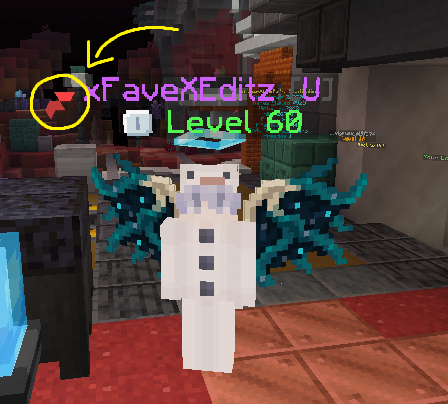
How it appears#
The logo appears next to the player’s in-game nametag so it reads as part of the player identity line.
It is useful on multiplayer servers where multiple Flarial users may be near each other.
The logo color can represent a Flarial role, not just whether the player is using the client.
Opting out#
You can choose not to advertise yourself through Flarial’s API signal. In the client source, the ClickGUI exposes a privacy toggle named Anonymous on API, plus separate display toggles for hiding logos locally.
Anonymous on API. This is the privacy option intended for staying anonymous on Flarial’s API, which is the signal other clients use to identify regular Flarial users.No Flarial Logo if you do not want your own client to draw Flarial logos beside nametags. This only changes what you see locally; it is different from opting out of API visibility.Logo types#
There are eight visible logo states in-game: seven special role logos plus the red default logo that every Flarial user gets automatically.

Red
Given to all Flarial users by default.

Cyan
Given to members of the Flarial developer team. They can be recognized with the Team role on Discord.

White
Given to Flarial support members and general staff. They can be recognized by staff roles on Discord.

Dark Pink
Given to people who are Flarial+ subscribers. The logo lasts for the duration of the subscription
Buy Flarial+
Light Pink
Given to everyone who boosts the Flarial Discord server. Run /claimrole in the commands channel after boosting. The logo lasts for the duration of the boost.

Purple
Given to close friends and family of the core Flarial team, plus people considered relevant in the MCBE, mostly modding, community. Repeatedly asking for Gamer may result in being permanently blacklisted from it.

Green
Given to people whose social media channels contain content promoting Flarial. Create a ticket in the Discord server to apply for the Media role.

Gold
Given to official Flarial partners, such as partnered servers, creators, or communities. Create a ticket in the Discord server to apply for partnership.
Claiming notes#
Purchase through store.flarial.xyz
Boost the Flarial Discord server, then run /claimrole in the commands
channel. The logo only lasts while your boost is active.